
Tutorials › 3
Simulate G-code from another program
NativeCAM's simulator isn't only for its own toolpaths. Open a file from any CAM program and watch it cut on your material, with your bits, before the machine does.
-
Set up the material
The simulation uses the current project's material and tool library. Choose File ▸ New for an empty project, select Material & Machine, and set the material size, thickness and zero to match how the file was programmed (for example, X/Y zero at the lower left and Z zero on top).
Check that the Tool Library (⇧⌘T) has bits with the tool numbers the file calls, and the right shapes and diameters. NativeCAM carves each tool change with the bit of that number.
-
Open the file
Choose File ▸ Simulate G-code File…, or drop the file on the canvas. The simulation starts right away; the file's name appears in the controls under the canvas.
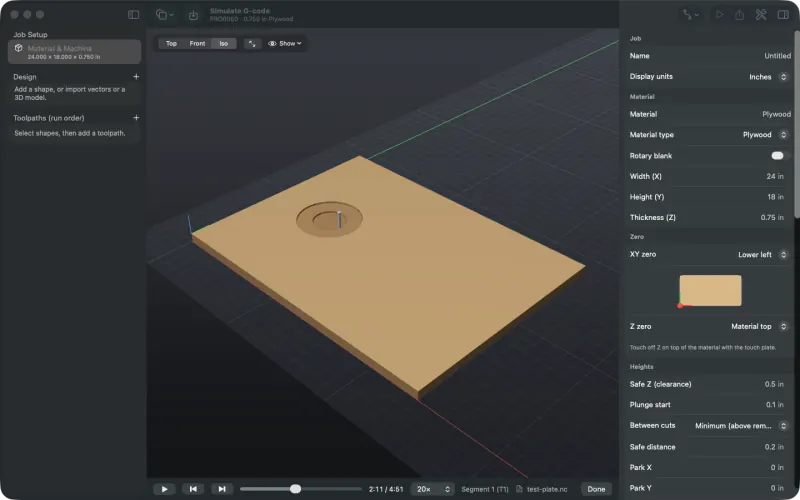
Part way through a hand-written test file: the first tool is clearing a circular pocket. Drilling cycles (
G73,G81–G83,G85,G86,G89) are expanded into the moves the controller makes, so peck drilling shows up as it will cut. So are tapping and boring cycles, read the way the project's controller runs them (tutorial). Anything NativeCAM can't follow is listed in a G-code notes message. -
Watch, scrub and inspect
Play, pause, step between tools and scrub the timeline as you would for a NativeCAM job. Drag to orbit and press ⌘1 for a top view. Look for cuts that go too deep, holes in the wrong place, rapids through material and anything that cuts outside the sheet.
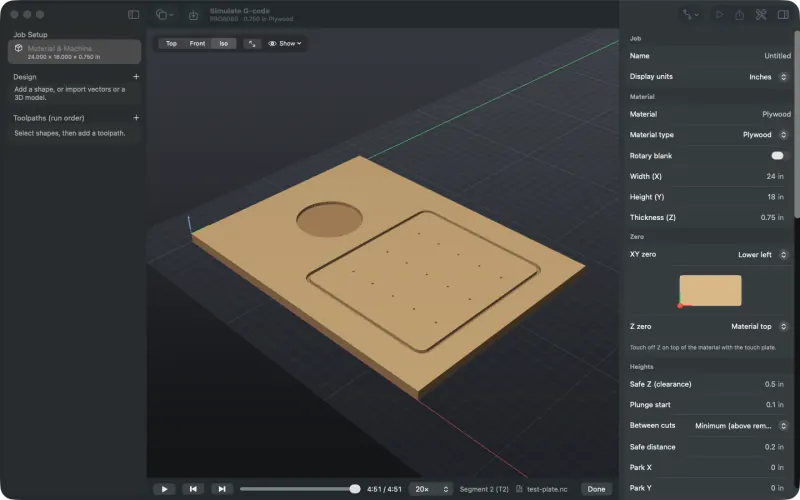
The finished file: pocket, groove, and fifteen holes from one G83 peck-drilling cycle. -
Or from the command line
The CLI simulates a file and prints what it removed and how long the job takes, and can render the result as an image:
swift run -c release nativecam-cli sim other-cam-job.tap --png result.pngTo compare two versions of a job cell by cell, write each heightmap with
--heightsand compare them withscripts/measure/compare_parts.py(see Develop).


Limits. Tapping and boring cycles are simulated only for controllers whose manuals describe them; see tapping and boring cycles. Imported G-code with A-axis words is simulated as if the part never turned, with a warning. A simulation shows what the file asks for; it doesn't prove your controller reads it the same way, so still air-cut it.