
Tutorials › 11
Feeds that follow the load
One feed for a whole toolpath has to suit its hardest cut. Slow it down for the first full-width pass of a pocket and every other cut runs slow too, with a thinner chip that can burn the wood. Adjust feeds for load slows only the hard cuts instead. This tutorial turns it on for a small plywood desk tidy and shows what changes.
Not tested on a machine. The rule for how much to slow down is worked out from chip geometry, not measured, and it hasn't been checked on a machine. Whether Mach4 keeps its smooth constant-velocity blending through each change of F hasn't been timed either, which is why the option is off unless you turn it on. Before using it on a job, try this on scrap. Program a straight line at one feed, then the same line with F alternating between 220 and 154 every 0.2 inch, and compare the two: the times, and any marks where the feed changes.
-
The job
The desk tidy is a 9 × 5 inch blank in ¾ inch Baltic birch plywood. Four toolpaths cut it, all with the ¼ inch end mill:
- Rough recess pockets a 4 × 2.5 inch recess with ½ inch corners, 0.375 inch deep, at a 40% stepover, leaving 0.02 inch on the walls.
- Finish recess walls takes that 0.02 inch off with an inside profile.
- Well pockets a 1¾ inch square with sharp corners, ½ inch deep.
- Cut out cuts the blank out with four tabs.
A pocket's hardest cuts are its first pass, where the bit cuts its full width, and its inside corners, where each ring meets more wood. Here those set the pace for the whole pocket.
-
Turn it on
Select a profile or pocket. Under Tool, below the feeds, turn on Adjust feeds for load. It's set toolpath by toolpath, and it's on here for all four.
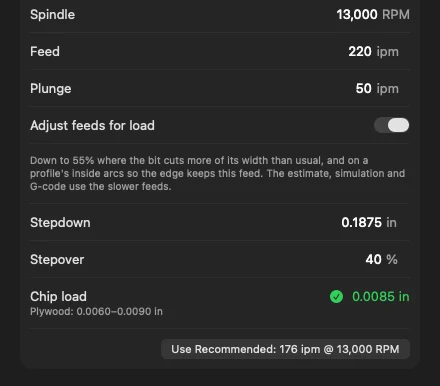
Adjust feeds for load, below the feeds. NativeCAM measures how much of the bit's edge is in the wood every eighth of a diameter along the path. Your feed is taken to be right for the toolpath's usual cut: a pocket's offset rings, or a finishing pass's light cut. It slows the feed only where the bit cuts more than that:
- A full-width cut, such as the pocket's first pass: down to 70% of the feed when the pocket is cleared at a 40% stepover.
- Inside corners, where each ring takes a bigger bite.
- Tight inside arcs on a profile, where the edge travels faster than the bit's centre: the centre slows to F × (R − r) / R, R being the wall's radius and r the bit's.
It never feeds faster than you set, never moves the path and never changes the spindle speed. It goes no lower than 55% of your feed, nor below the thinnest chip the chart allows for the bit in the job's material.
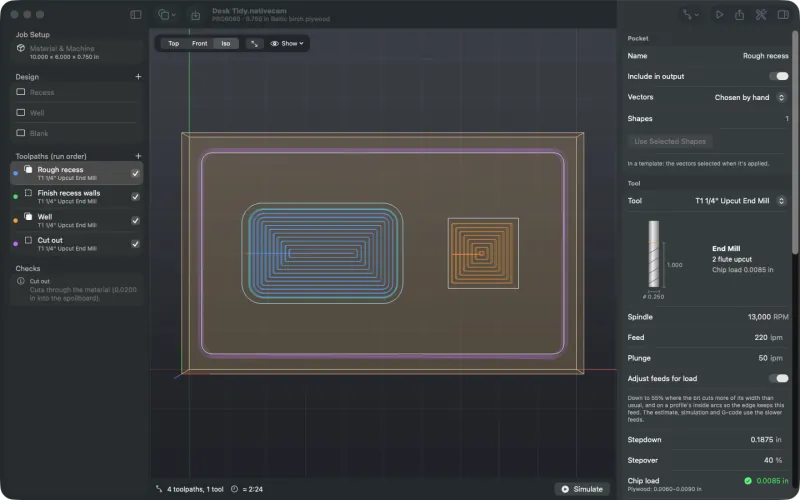
The desk tidy with Rough recess selected. -
What changes in the G-code
The path is the same; only the F words change. Feeds come in steps of your feed: 100, 85, 70, 55% and lower. Here that's 220, 187 and 154 in/min. Each change comes at least half a diameter after the last, so a short slowdown runs on a little. The start of Rough recess:
(Toolpath: Rough recess  Tool: T1 1/4in Upcut End Mill)
G00 Z0.5000
G00 X2.7450 Y2.9950
G00 Z0.1000
G01 Z-0.1875 F50.0
G01 X4.2550 F154.0
G01 Y3.0050
G01 X2.7450 F220.0
G01 Y2.9950
G01 X2.6450 F154.0
G01 Y2.9188
G03 X2.6688 Y2.8950 I0.0238 J0.0000
G01 X4.2081 F220.0
G01 X4.3312 F154.0
G03 X4.3550 Y2.9188 I0.0000 J0.0238
...
The first pass down the middle, a full-width slot, runs at 154. The bit speeds up to 220 along each ring's straight sides, and slows to 154 or 187 into the corners. An arc keeps one feed all the way round.
The Cut out keeps 220 all the way round. Cutting a part out of solid wood is a full-width slot from start to finish, which is that toolpath's usual cut, so there's nothing harder to slow for.
-
The run time and the setup sheet
The estimate, the simulation's timing and the inspector's Result use the scheduled feeds:
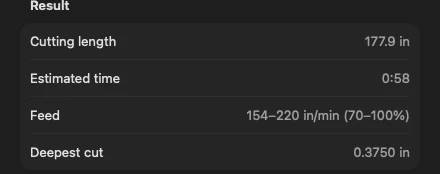
The Result shows the range of feeds. The whole job comes out at 2:24, against 2:22 with the option off. Only the hard cuts are slower, so it costs two seconds. The alternative, lowering the whole pocket's feed to 154 for its first pass, would slow every cut.
The setup sheet marks each toolpath whose feed varies, “154–220 in/min *”, with a note: “Adjust feeds for load: the feed slows in full-width cuts, inside corners and tight inside arcs, and runs at the higher feed elsewhere.” Here's the desk tidy's.
-
In hardwood it holds off
Slowing the feed at the same spindle speed thins the chip, and a chip that's too thin rubs and burns. So the feed never goes below the one that makes the chart's thinnest chip for the bit in the job's material.
Change the material to hard maple and the starter ¼ inch bit is already near that floor at 13,000 RPM and 220 in/min. The pockets aren't slowed at all, and Checks says why:
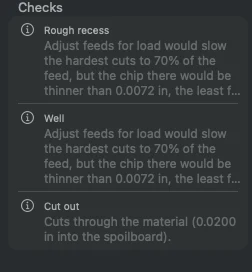
In maple, Checks says why nothing slows. Adjust feeds for load would slow the hardest cuts to 70% of the feed, but the chip there would be thinner than 0.0072 in, the least for this bit in hardwood, so they aren't slowed. A lower spindle speed would let them slow without burning.
Lower the spindle speed and keep the feed, and the chip gets thicker, which leaves room to slow. At 10,000 RPM and 220 in/min the chip is 0.011 inch, the top of the hardwood range: the hard cuts slow to 154 again, and the notes go. At 11,000 RPM they slow only to 187.
-
Where it applies
- Profiles and pockets, with end mills, bull noses and surfacing bits. With a ball nose or a V-bit the toggle says it doesn't apply.
- Plunges and ramps steeper than 45° keep their own feeds.
- Wrapped rotary toolpaths are fed in inverse time (
G93), so they keep the programmed feed, and Checks says so. - It doesn't change the file format. An older build ignores it and cuts at your feed throughout, which the schedule never goes above.

Limits. The slowdowns aren't calibrated on a machine. Depth of cut doesn't change the feed, so a pass deeper than the bit's diameter isn't slowed for it. Inside-arc slowing needs arc output: with arcs off, curves are short lines and slow only for how much of the bit they engage. A light pass after another toolpath is measured roughly, from the job's material model. See known limits.