
Tutorials › 7
Rest machining: a big bit first, a small one for the corners
A small end mill cuts tight corners and narrow slots, but clearing a whole pocket with it is slow. Rest machining clears the pocket with a larger bit first and sends the small one only where the large one can't reach. This tutorial cuts a plywood desk tray with three pockets.
Not cut on a machine yet. Rest machining has only been checked in the simulator, where a pocket cut with both bits matches the same pocket cut with the small bit alone. Air-cut it, and on your first real one check that the small bit's wall pass leaves no step where the large bit's clearing met it.
-
Why rest machining
The tray's pockets have square-ish corners and a 3⁄16 inch cable slot, so they're cut with a ⅛ inch end mill: it leaves corners 1⁄16 inch round and fits the slot. But it takes small bites, 1⁄16 inch deep and a fraction of its width across, and with it alone the job is estimated at about 32 minutes. With rest machining, a ¼ inch bit clears the bulk and the ⅛ inch one only finishes. On a machine with manual tool changes, that's one extra collet swap for much less time with the small bit.
-
Set up the pockets
Draw or import the shapes, then add a Pocket toolpath for each with the ⅛ inch end mill:
- Pen tray: 8 × 1¼ inches with square corners, ½ inch deep.
- Phone recess: 4½ × 2¾ inches with a 3⁄16 inch cable slot running out of one side, ⅜ inch deep.
- Coin pocket: 1½ × 2 inches, ⅜ inch deep.
The tray also has five ⅜ inch Pen holes, pocketed ½ inch deep with the ⅛ inch bit alone, and a ¼ inch Cut out tray profile with tabs, last.
-
Clear with a larger tool first
Select the Pen tray toolpath and, in its Rest machining section, turn on Clear with a larger tool first. NativeCAM picks the smallest end mill in your tool library that's at least 1½ times the pocket's bit, an upcut first: with the starter library, the ¼ inch upcut (T1) for a ⅛ inch bit, and the ½ inch upcut (T10) for a ¼ inch one. Choose another under Larger tool. If the library has no end mill larger than the pocket's bit, the switch stays off and the section says to add one.
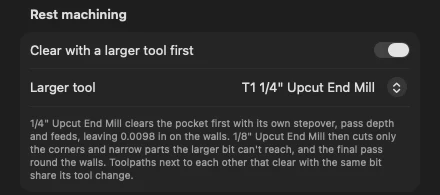
The pocket's Rest machining section. - The larger bit clears first, with the pocket's strategy (offset or raster) and its own stepover, pass depth and feeds from the tool library.
- It leaves the pocket's allowance plus a tenth of the small bit's diameter on the walls, at most 0.01 inch: 0.0098 inch here. So the small bit cuts the whole wall, and there's no step where the two bits meet.
- The pocket's own bit then clears only what's left (the corners, slots narrower than the big bit, the gaps round islands), overlapping the big bit's cut a little, and makes the final pass round the walls at each of its pass depths, with any corner reliefs. The pocket comes out the same as the small bit would cut it alone.
Turn it on for the Phone recess and the Coin pocket too, with the same ¼ inch bit.
-
See what each bit cuts
Each rest-machined pocket's row in the sidebar now reads "T1, then T2 1/8" Upcut End Mill", and it becomes two toolpaths in the output: Pen tray – clearing with the ¼ inch bit and Pen tray with the ⅛ inch.
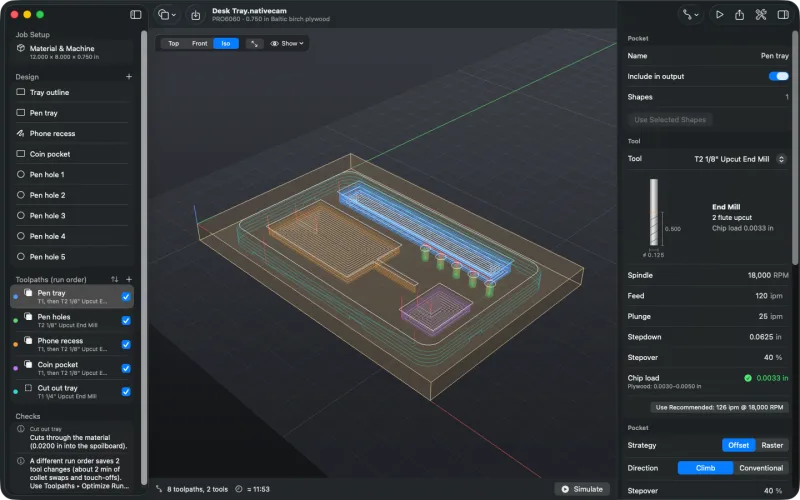
Three rest-machined pockets, the pen holes and the cut-out. The toolpath preview draws the clearing in a paler shade of the toolpath's colour. In the phone recess, the pale rings are the ¼ inch clearing; the stacked orange passes are the ⅛ inch bit going round the walls at each depth and clearing the cable slot, which the ¼ inch bit can't enter.
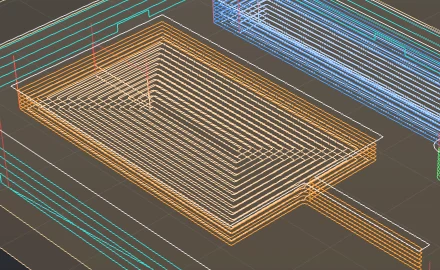
Pale: the ¼ inch clearing. Orange: the ⅛ inch walls and slot. The inspector's Result section gives each bit's time. The pen tray takes 2:38, against 13 minutes with the ⅛ inch bit alone.
It doesn't always pay. Cut with a ¼ inch bit, the same pen tray takes 1:13 on its own. With the starter ½ inch bit clearing it first, it's 37 seconds of cutting, but the tool change brings the estimate to 1:38. The run-time estimate counts tool changes, so compare the totals. The ½ inch bit runs at 6,500 RPM, near the bottom of a VFD spindle's range; if yours won't go that slow, raise the speed and the feed together.
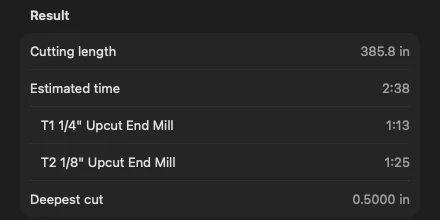
Time for each bit. Both bits are checked separately for chip load, feeds and depth against flute length. Checks also warns when the larger tool isn't larger than the pocket's bit, isn't a flat end mill, or doesn't fit in the pocket at all (the small bit then clears it all). It also warns when the larger tool reaches the whole pocket: try it on the round pen holes and Checks says so:
The clearance tool (1/4" Upcut End Mill) reaches the whole pocket, so this toolpath's tool only makes the pass round the walls. Cut the pocket with 1/4" Upcut End Mill alone and save a tool change.
-
Simulate
Press ⌘R. The ¼ inch bit clears each pocket in a few deep passes, then the ⅛ inch bit comes in for the corners, the slot and the walls.
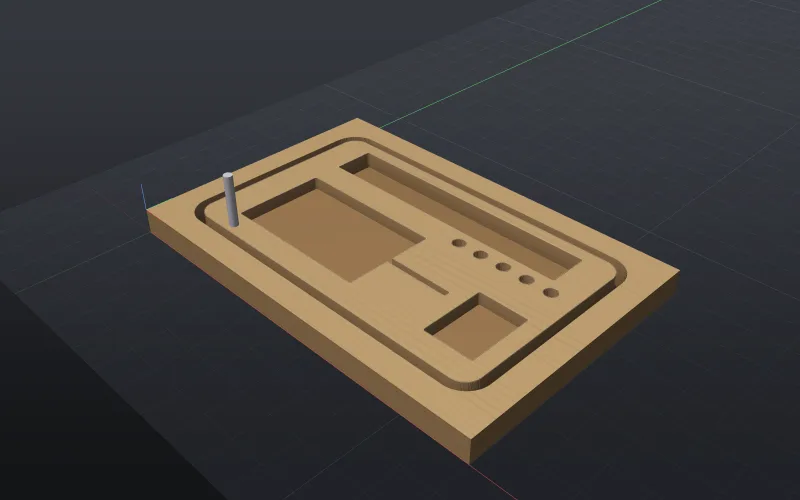
The finished tray. The cable slot was cut by the ⅛ inch bit alone. -
Save tool changes with Optimize Run Order
Pockets next to each other in the toolpath list that clear with the same bit share it: the ¼ inch bit clears both, then the ⅛ inch bit finishes both. In the order drawn here, though, the pen holes sit between the pen tray and the other pockets, so the job changes tools four times (¼ → ⅛ → ¼ → ⅛ → ¼) and Checks says so:
A different run order saves 2 tool changes (about 2 min of collet swaps and touch-offs). Use Toolpaths ▸ Optimize Run Order.
Choose Toolpaths ▸ Optimize Run Order. It brings the three pockets together, then the pen holes, then the cut-out: the ¼ inch bit clears all three pockets, the ⅛ inch bit finishes them and cuts the pen holes, and the ¼ inch bit comes back for the cut-out. That's two tool changes, and the estimate in the status bar drops from about 11:53 to 9:54.
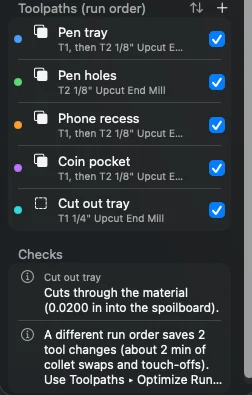
Before: four tool changes. 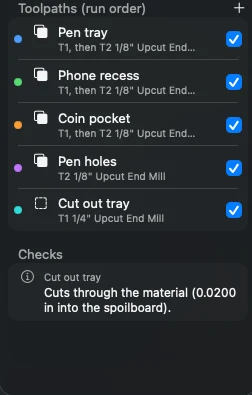
After: two. It works the same for V-carves whose flat areas are cleared with the same end mill.
-
Export and the setup sheet
Press ⌘E to check and export. On a machine with manual tool changes, the program stops at each tool change: swap the collet, touch off Z again, and press Cycle Start. File ▸ Export Setup Sheet… lists each tool change in the run order, and its Rest machining section says what each bit cuts in each pocket (example).
Rest machining doesn't change the file format: an older build of NativeCAM opens the project and cuts each pocket with its own bit alone, which is slower but not wrong.


Rest machining works inside one pocket toolpath. A pocket can't yet take its rest from an earlier toolpath, and there's no 3D rest machining yet: see known limits.